Google
 
Showing posts with label Tips and Tricks. Show all posts

Tuesday, March 22

The All New Anything for Free

Yes, I am totally back. Been busy with a lot of things so before I try to be back on track, I just made sure that I already have the All New Anything for Free UI hosted of course on blogger. Also, you can see that I have a nice header and I need to say thanks to Background Labs for a nice graphic. Then I just use GIMP to enhance it all the more.

I just love the new interface and new features of blogger such as the pages. You would notice that I experimented some of its lovely features and I am so loving all of them! How about you, what is your most favorite Blogger feature?
Read More !

Saturday, July 12

Clipnabber: Easy way to Download Videos from Youtube, Megavideo, Dailymotion, Veoh, Tudou and many more!

I love watching videos from youtube and even tudou. However, there are times that I got irritated when I see that buffering messages everytime I watch. Also, there are cases that when you want to watch your favorite youtube video again, it was already deleted. And now I though that it must be good to just download the video and save it on pc hardrive. Much more that I like the idea when my daughter had that mini MP3 / MP4 player.

If you will google internet, you will find a lot of software that will help you in downloading these file. But I choose CLIPNABBER since it is web-based tool so you do not need to download it.


To download the video as an FLV file, follow these steps:
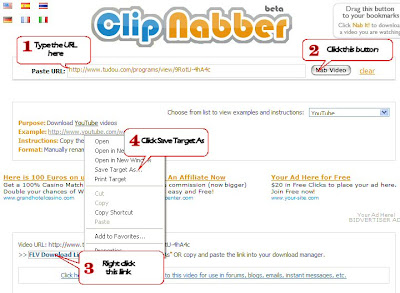
1. Go to : http://clipnabber.com/ and then type the URL of the video link on the PASTE URL box.
2. Click NAB VIDEO button.
3. Right click on FLV DOWNLOAD LINK
4. Select SAVE TARGET AS
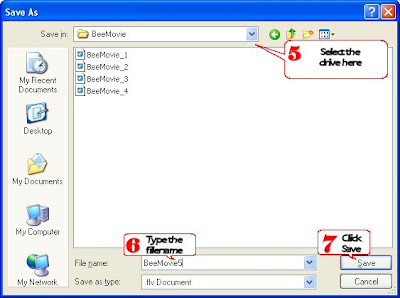
5. Select the drive or folder where you would like to save the file through the SAVE IN box.

6. Type the name of the file on the FILE NAME box.
7. Click SAVE.

Note: Use Internet Explorer.


Just wait until the file is fully downloaded. Then, you can watch the file using an FLV player. If you have other type of players or would like to use a gadget such as PSP or MP4 player to watch the movie, then you need to convert the file on the desired format.

And here is a helpful information from clipnabber help page:

How do I convert .flv files for use on my iPod or PSP?
There are several applications you can use for this purpose. Here are a couple that are free (at least shareware) and have been known to work. For Windows: Replay Converter. For Mac: iSquint or ffmpegX.

But my husband downloaded Xilisoft Software so that is the one we are currently using to convert the files.

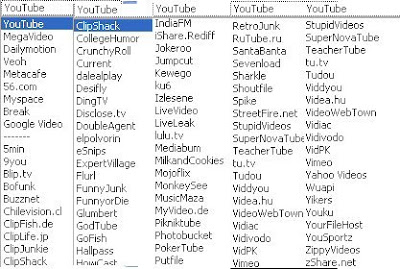
By the way, here are the list of websites that you can download through clipnabber.

That's basically it! And now you could enjoy watching your favorite videos!
Read More !

Tuesday, March 11

Tips & Tricks: Adding Label Clouds on Blogger

Are you tired of that boring Label or Category List that you have on your sidebar?

You may want to use the Condensed Label Format or what is commonly called "Label Cloud." Visit phydeaux3 site to have the step by step instruction on how to create Label Clouds on your blog. Have Fun!
Read More !

Pictobrowser: Embed your pictures on your blog

If you want to easily post multiple pictures on your blog, you can utilize a slideshow or flash. And PICTOBROWSER will help you with this. Take a look at this one:


All you have to do is visit their website: http://pictobrowser.com/. Click on the PICTOBUILDER button at the upper right corner of the screen and follow the onscreen instruction until you will have the code that you will be pasting on your blog.

Now that you have the code, sign in to blogger, click LAYOUT then go to PAGE ELEMENTS. Click ADD PAGE ELEMENT link and select HTML/JavaScript. Paste the code on that window and click SAVE CHANGES (Note: You can also rearrange the page elements by dragging and dropping each on their appropriate position, just click save when you are done). Then you'll have your beautiful slideshow on your blog.

Kudos to the brains of Pictobrowser: Diego Bauducco, Carlos Gomez and Maya Gorton. Keep up the good work!
Read More !
Sign up for PayPal and start accepting credit card payments instantly.